 Image via Wikipedia
The Vocation Education and Training (VET) Sector, for those who are not sure, "prepares trainees for jobs that are based on manual or practical activities, traditionally non-academic, and totally related to a specific trade, occupation, or vocation". In New Zealand the VET sector is in part serviced by 39 Industry Training Organisations (ITOs), as well as by Polytechnics, Private Training Establishments, and Wananga.
A couple of the key points that make it necessary to think creatively when considering ICT enhanced learning and teaching (ICTELT) and the VET sector include meeting the needs of these learners who will, like all learners, have a variety of learning preferences, but may also face literacy, language and numeracy challenges, and life and work commitments. These same learners are likely to also have a rich range of skills (both formal and informal) and need a way to capture their prior learning and experience (click HERE to watch a student speak about Recognition of Prior Learning - RPL). If ICTELT is seen as a positive way of assisting learners to learn creatively, however, then these are also the students and trainees, who are likely only to have limited access (at best) to connectivity and technology. On top of all these factors is the culture that is often prevalent in industry where learning 'virtually' at a distance or in a blended course is perhaps not seen as feasible or effective (click here to download a report from 2008 around the New Zealand context entitled "Using e-Learning to build workforce capability: A review of activities", and for comparison a report about small businesses and eLearning in Australia in 2008).
 |
| Civil Engineer Students at Dubai Men's College |
Nevertheless, times are changing, and with them is increased access to broadband (see for example the National Broadband map for NZ and click this link for an explanation why bandwidth is important), personal ownership and use of computer(s) and mobile phone(s) is increasing (click here to see the 2009-2010 statistics), a greater awareness that 'soft' skills such as critical thinking, as well as social and communication skills are as important as the key competencies required to be effective in a specific career.
Flexibility and meeting learning needs and preferences, while making learning accessible to as many people as possible are key factors, and ICTELT and well-designed blended and distance courses appear to offer the potential to work towards these ideals.
Flexibility and meeting learning needs and preferences, while making learning accessible to as many people as possible are key factors, and ICTELT and well-designed blended and distance courses appear to offer the potential to work towards these ideals.
This resource provides links to a few examples and case studies of ICTELT use in VET, in particular from Australia where there is a massive initiative in this sector see for example the Australian Flexible Learning Framework who have a massive range of resources, events, research, case studies, reports, training and ideas). There are also links to a couple of associated research articles and tools. Please let me know if you have anything you would like me to include in this resource - I would be really glad to do so :-)
Community and learning
One of the most exciting examples of bringing together community and VET training in a culturally responsive way is the initiative trialled in 2009 in conjunction with the Garma festival (located 40km from the township of Nhulunbuy (Gove) in the Northern Territory, Australia at the Gulkula festival site. The festival theme was Creative Industries, with four vocational foci:
- Construction
- Multimedia
- Tourism - specifically tour guiding
- Music
To listen to Roger Bryett speak at the Creative Indigenous Economies forum please click HERE (mp3 - 8.75mb).
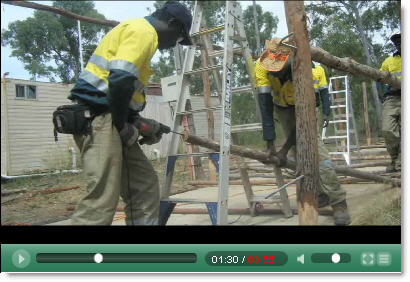 |
| To view the streaming video of Roger Bryett speaking at the forum about this initiative please click HERE |
 |
| Image source |
Other examples include (all from Australia):
- 'Top End Groove' - a project that aims to establish a cultural tourism business and training network. The project aimed to develop and grow indigenous and cultural tourism businesses through the use of technology and eLearning by enabling knowledge sharing, improving access to skills training and creating a central point for promotion and marketing indigenous tourism. Click HERE to listen and find out more about the project
- The Jobs for our Mob project was established to develop an e-training centre which incorporated technology to identify and deliver the pre-vocational skills required for indigenous people wanting to enter the mining, construction or engineering fields.Click HERE to listen and find out more about the project.
- This case study, "Panel beating apprentices take to technology", describes an Australia-wide skill shortage in the automotive vehicle body repair industry first prompted Brisbane North Institute of TAFE todevelop a programme with training materials available on CD-Rom and online, thereby making a traditional industry area more technologically savvy.
Examples of online environments in the VET sector
 |
| Example home page designed for an LMS |
- The Diploma Children's Services - an open Moodle site that is a document and information repository for the qualification
- TAFE Port Adelaide Community Service and Health External Studies - an open Moodle site with information about the qualification and its requirements
ePortfolios
To view this video full size, please click HERE
An ePortfolio helps students with the identification, assessment and recognition of what they know and can do, and could include evaluations, comments, feedback and reflections from peers, managers, facilitators etc who have been involved in the applicants life/learning journey. The assessment, therefore, of what a person can do is from authentic sources, collected over time (click this link to access "Verification of a person's aualification e-portfolio use cases", and this link to access "Vocational Education and Training e-portfolio use cases").
The contents of an ePortfolio would be assembled over time, and could include some or all of the following:
- Evidence of informal or professional networks regularly cultivated, contributed to, and participated in online and why these have been important / influential
- Examples of ideas, thinking, innovations from the applicant that have been shared in communities (including online) and what comments, feedback and reactions were elicited
- Illustrations of collaborative creativity, problem-solving and work (including with online contacts and communities)
- Work samples e.g. something the applicant has designed, created, done or written (including video records of processes, images of projects at various stages of completion, and a selection of images of showcase, finished pieces)
- A record of performance e.g. video recording, reflections (audio/written), appraisals (audio/written - elicited and spontaneous)
- Copies of any statements, references, images, video clips, audio, or articles about the applicant's employment or community involvement
- Documents which recognise the applicant's expertise, e.g. copies of licences, awards, prizes, membership of professional bodies - along with reflections / comments around these achievements
- Evidence of training e.g. copies of school reports, certificates or statements about education and training / outline of any course the applicant may have undertaken
- References or letters / performance reviews from employers, work colleagues, clients, community leaders that link specifically to required competencies or elements covered
For a fuller list of resources around using ePortfolios to enhance education in general, with some examples relevant for VET, click HERE.
 |
| Hairdressing, a case study using Mahara |
Examples of ePortfolio use in the VET sector include:
- "Skills recognition using e-portfolios: Hairdressing, a case study using Mahara": This is a case study, again based in Australia, that is trialling the use of the Mahara online e-portfolio platform to support the existing skills recognition services being offered to students undertaking WRH30106 Certificate III in Hairdressing & WRH40106 Certificate IV in Hairdressing
- Example E-portfolio View: Permaculture - Demonstrating the principles
- Aquaculture example - the machinery: A workplace learning and assessment ePortfolio
Multimedia
For a fuller list of resources around using multimedia to enhance education in general, with some examples relevant for VET, click HERE.
- Overview of a short case study (NZ) conducted in 2008, which aimed to foster information literacy with automotive students at Unitec NZ (to read the full paper about multimedia and education, click HERE).
- Example of multimedia used by a boat building student from Unitec NZ to capture their work over time
- Example of students at Unitec NZ in vocational courses using multimedia and mobile devices for reflection, collaboration, inspiration, and creativity
Support: Completion, retention and success
This report ("Student Learning Support Programmes that demonstrate tangible impact on Retention, Pass Rates and Completion") is a combination of summaries and brief case descriptions of some of the effective programmes and other support mechanisms that NZ Tertiary Learning Advisors (TLAs) provide for students in universities, polytechnics, institutes of technology, and other tertiary institutions (click HERE for the executive summary). Findings indicated that there were significantly higher course pass rate for students who used the programme (84.4%, compared to 69.8% for those who did not use the programme), as well as significantly higher final exam pass rates (71.6%, compared to 62.8%). Some of the strategies included the hosting of models, guides, examples and support in a Learning Management System (LMS) alongside personal, one-to-one support, and the use of an online skills survey. However, the main finding was that relationship and trust building, as well as recognition of learning preferences and cultural appropriacy, were key factors for success.
Assessing and assessments
Assessing and assessments can take many forms, including:
- Facilitate and record a discussion within a trainee's community, where members of that community speak about the applicant
- A narrated 'learning story' (recorded - audio or video)
- Record an oral presentation for the assessor or assessment panel
- Take part in a role play (asynchronously or synchronously - face-to-face or virtually; e.g. in Second Life)
- Demonstrate knowledge/application of skills through a scenario with video/audio evidence recorded
- Be assessed on the job with video/audio evidence recorded
- Complete an online assessmen
- Complete a project that is partly or wholly online, and possibly part of an ePorfolio
- Have skills and knowledge attested to by an appropriate person, e.g. Kaumatua
Where multimedia is used there can be no question as to the authenticity of the event / process. Furthermore, there is potential for reliable evidence, when compared with a paper-based portfolio, of competency and application of the in required skills in 'real world' contexts.
Although there is no mention of ePortfolios or alternative ways of collecting evidence in these following reports, it is worth bearing in mind some of the principles mentioned: "Assessment of Learning in the workplace: A Background Paper", which can be read in conjunction with "A guide to good practice in ITO structures and systems for on-job assessment".


![Reblog this post [with Zemanta]](https://lh3.googleusercontent.com/blogger_img_proxy/AEn0k_t0ULQjS10l4esEqnO14VOFXZmGMTT2Rv-mw5Qc5n1KLaWQ0ZAjlKsDuQWJIgqHUuhLzZXsBEva3HKNhYA5g4vhxG0pRlkGHsOuvWePHBbvPuV10jyq106Ec1MaIuJ_hXwu4QiCwzV4fFFMcWs2dIDI=s0-d)


 Posts
Posts


