Showing posts with label mlearning. Show all posts

Wednesday, September 23, 2015

Underpinning theory and practice with kaupapa Māori: Mobile learning framework

My friend and colleague whaea Yo Heta-Lensen has observed that "online and blended learning courses are often written to instructional design guidelines that have been developed from a specific theoretical viewpoint taking a one-size fits all approach that cares little for indigenous knowledges" (Heta-Lensen, in press).

It was great, therefore, to see He Whare Ako He Whare Hangarau, work done by Dr Acushla Sciascia and Dr Claudio Aguayo, as part of the NPF14LMD - Learners and Mobile Devices Ako Aotearoa National Fund Project.  Would be good to read your thoughts and reactions :)

Acushla and Claudio share that the He Whare Ako, He Whare Hangarau framework weaves "kaupapa Maori theories, values and approaches to learning and teaching (ako) and provides distinct mobile learning parallels of theory and practice, conceptualised into the visual of a metaphorical wharenui (traditional meeting house). The framework depicts the relationship between ako and mLearning and engages a range of pedagogies that are culturally responsive and that are open to the affordances of technologies. The framework is a values-based approach to understanding the role of mobile devices in the learning context".

Key objectives include:
  • Locating the teacher/learner at the centre and consider both as co-learners / co-teachers
  • Underpinning theory and practice with kaupapa Māori values such as whanaungatanga, kotahitanga, whakamana, manaakitanga, etc
  • Weaving mLearning theories and frameworks that espouse best practice   teaching and learning strategies using technology
  • Encouraging new approaches and pedagogies for teaching and learning that are culturally responsive
  • Conceptualising how the affordances of mobile learning and devices contributes to the learning process and overall learner experience
You can read an overview here: https://drive.google.com/file/d/0B-PzrzVpHIroNGhDSVF6elR4UUU/view, and watch the video below as well as access the accompanying Prezi presentation.
.

Monday, May 13, 2013

How do you get involved in online communities?

This is a cross-post of a guest blog post (Participating in Online Communities for Mutual Support) written for Madelyn Griffith-Haynie's wonderful online resource, http://www.ADDandSoMuchMore.com. Many thanks to Madelyn (CTP, CMC, A.C.T., MCC, SCAC, Foundational Concepts of the Intentionality Series) for given me the OK to cross post. It's all about reciprocity, so please pop across to have a look at her site.


This image was selected as a picture of the we...
This image was selected as a picture of the week on the Farsi Wikipedia for the 13th week, 2011. (Photo credit: Wikipedia)
Personally and professionally, I don’t know what I would do without being a member of online communities.

I am constantly challenged to think and reflect, as well as affirmed or guided in some of the ideas I am developing.

On the social side, I have had the pleasure and privilege of ‘meeting’ a vast variety of people from around the world, including Madelyn, who are incredibly generous with their time, and with sharing their thinking.

You might be saying to yourself,
  • “But I don’t have anything to say that hasn’t already been said,”
  • “I don’t have time,” or
  • “What if I say something wrong?”
I know I had similar concerns before I started getting involved in online communities.

So why might you want to get involved?

In July 2011 in her blog post Creating Community Together, Madelyn threw down a challenge that read as follows:
“Let’s work together for the mutual good of our communities and our planet – becoming resources for each other because it is simply the right thing to do – meaning the thing that will create the kind of world we want – a world that works for EVERYONE.”

You may have already taken up her challenge and are comfortably participating in and contributing to online communities. But you may also be sitting on the fence and not feeling very comfortable about jumping into the online community spaces where you may feel you need to build your digital literacy skills before joining the conversations.

In this blog post I would like to describe what I mean by digital literacy skills, give a brief overview why your voice is important in online communities, and finally, I’ll provide a grab-bag guide to getting involved.

Why online communities?

Over a period of about 13 years I had become increasingly interested in how human beings interact and ‘learn’ in online spaces, especially when they are offered opportunities to become **immersed. An immersive environment enables people to experience a variety of approaches and ideas, at the same time as exploring them intellectually.

During this period the Internet grew in popularity as a place for formal and informal learning, and hardware and software became more affordable. I have become increasingly excited by the potential of eLearning and Mobile Learning (mLearning). Being able to connect is providing a range of ways to co-construct understanding, to develop creative problem solving skills, and to become more culturally aware. This, however, entails a paradigm shift away from content to a greater focus on mutual support and synergistic thinking, as well as an increasing requirement for individuals to possess digital literacy skills.

**Immersive digital environment / experience: Adapted from gaming environments, references to immersive experiences illustrate instances where an online CoP member becomes immersed in the ‘narrative’ of the community and its interactions. As such, the member feels as though they are part of an online ‘universe’, where they have the option to create and design the spaces (Adams, 2004).

What is digital literacy?

Digital literacy can be broadly categorised in three distinct skills sets (Reynard, 2009).
  • The first skill set is being able to navigate the Internet to locate and evaluate resources.
  • The second skill set includes being able to create, repurpose, share and comment on resources hosted on the Internet.
These skills usually require some sort of account creation or membership to a community (for example, YouTube), as well as awareness of rights to use and re-use digital objects. Associated activities may include the sharing of links, images, or commenting on blogs.
To move to this stage of development is to move from the consumption of digital resources to the creation or adoption of an online identity.
  • The third skill set involves the co-creation of ideas online and the active cultivation of an online identity. This requires a sophisticated level of digital literacy skills, whereby participants make sense of existing knowledge and reinterpret it in a way that fits within their existing knowledge framework, thereby, disconnecting, and reconnecting “knowledge fragments through knowledge creation” (Littlejohn, 2011, Para. 3). This sense-making will often occur within learning ecologies, online communities and networks (Siemens, 2003).
Healthy, established online communities tend to have members who have developed mutual trust and respect, and are reasonably confident in their digital literacy skills.
Other members, who remain readers of conversations and content (sometimes known as ‘lurkers’) are likely to have developing digital literacies, less confidence in their online persona. That is not to say one is necessarily directly related to the other, but rather to highlight that full participation, which leads to an immersive experience, requires digital literacies development.

Why your voice is important

I have explored online communities in a variety of situations, prior to taking on the position of national coordinator in New Zealand of a pilot project to develop a Virtual Professional Learning and Development (VPLD) Model (initiated in October 2009 by the Ministry of Education, who also funded the project).

My initial experiences were in line with the current research findings of the time (e.g. Hallam, 2008; McDermott, 2002) – but it was one thing reading about the challenges and another thingexperiencing them!

I found that a vibrant online community depended on establishing a balance between too little and too much communication, between facilitated and organic activities/contributions, and between confident and ‘developing’ contributors.

I discovered that, with encouragement and support, members could be mentored through the process of developing digital literacy skills. However, many members had not participated in an online community before, and were not aware of the level of engagement required to really get the ball rolling, so community enthusiasm waxed and waned.

I was frequently disappointed that I was the only one to respond to a post or discussion, or that responses were superficial.

Without a reasonable level of engagement from online community members, there was little sense of a mutual support network, and in turn, of their voices influencing developments and policy.
Nevertheless, slowly but surely, membership, momentum and the quality and quantity of contributions grew over the next 3½ years.

Some of the challenges

Time and opportunities are needed for the more confident members to ‘model’ some online community building behaviours, so that other members are able to build an identity within a newly formed group. Individual participants also face challenges that include (but are not limited to):
  • unfamiliarity with netiquette and notions of reciprocity in an online space
  • uncertainty of purpose
  • lack of confidence in the value of their contributions
  • workload and other life commitments (which impact the level of community engagement)
  • little or no peer support
  • lack of access to appropriate technology and connectivity.

A grab-bag guide to getting involved in online communities

One of the things you need to do, if you want to get involved, is join a community. First you’ll need to find an online community that is formed around a topic that interests you. This could be through recommendations from friends or colleagues, or through a simple online search.
Once you have found a likely community take a trip around – set by 30 or 40 minutes to dip into all the spaces on the community site, and get a feel for the tone of the conversations.
  • If you don’t like the tone, don’t join the community.
  • Don’t give up though – find another one that seems to be more your ‘fit’.
And then, once you have joined:
  • Set up an online profile.
Start by considering what other members of this specific community would be interested in; keep it short and sweet initially. And don’t share anything you wouldn’t be comfortable sharing with someone if you met them face-to-face for the first time.
  • Upload an image to your profile; it doesn’t have to be of you – it can be your dog, your cat, your garden, your car, or something meaningful to you.
An image helps people feel as though they are ‘getting to know you’ because, as humans, we are pretty visual creatures.
  • Within two weeks of joining the community, find a blog post, resource, or online discussion that resonates with you in some way and ‘like’ it.
  • Within one month of joining keep your eyes open for a blog post, resource, or online discussion that resonates with you in some way and leave a comment.
  • In no longer than two months, locate a resource you think is interesting or useful, and share it with the community.
You only need to add a couple of sentences about why the resource caught your attention.
And don’t get disheartened if you don’t get any responses…other folks are going through the same online journey as you :-)

LAST COMMENT from Madelyn

So NOW you know that if you found this information helpful, “reciprocity” means you INTERACT, right?
So THAT means that you do one or more of the following –
You:
  • click “like” on the page (from the TOP on the WordPress Menubar for WordPress.com visitors – anyone can “like” at the bottom, near my tiny photo below, where I clicked to “like”)
  • share it on one of your social networks, like FaceBook, LinkedIn, etc. (at the bottom of the article, on THIS blog)
  • leave a comment (keep scrolling down for comments – AND you can reply to comments from others to get a full-fledged conversation going), or
  • rate it five stars, found at the top – you’re pretty great about that already, btw!
As always, the goal is to affirm and acknowledge, not to “vote” or argue — so keep things totally positive as you interact, even if your point of view is completely different as you speak your truth ~ mgh

References

  • McDermott, R. (2002). Knowing is a human act. Upgrade: The European Online Magazine for the IT Professional, 3(1), 8-10.

Related Articles from Ethos Consultancy

Related Articles ’round the ‘net
Enhanced by Zemanta

Wednesday, May 1, 2013

Framing mobile learning from the perspective of learners’ experiences

Mobile learning has been around as a concept for quite a while, as something that involves "any sort of learning that happens when the learner is not at a fixed, predetermined location, or learning that happens when the learner takes advantage of the learning opportunities offered by mobile technologies" (MOBIlearn, 2003). Interestingly, even though ostensibly in this definition, the focus is on the learning and the experience of the learner, it still returns to the affordances offered by the technology.

In a paper recommended by Tessa Gray (here), she pulls out the following quote:
There is an ongoing need to examine the pedagogies that are suitable for m-learning, and to conceptualise m-learning from the perspective of learners’ experiences rather than the affordances of the technology tools (Traxler 2007, p. 1)
Tessa goes on to explain that Viewing mobile learning from a pedagogical perspective "unpacks a pedagogical framework - developed from two mobile learning projects (Australia and UK) from a socio-cultural perspective". She also indicates that the 3 aspects highlighted are authenticity, collaboration and personalisation.

What are your own experiences with mLearning (either as a learner or a facilitator / teacher / trainer)? What are your responses to the framework in the paper? Is it something you might find useful?

Reference: "Guidelines for learning/teaching/tutoring in a mobile environment"MOBIlearn. October 2003. p. 6. Retrieved June 8, 2009.
Enhanced by Zemanta

Sunday, September 30, 2012

Learning in the 21st Century: A 5 Year Retrospective on the Growth in Online Learning

English: Diagram of technology-empowered profe...
English: Diagram of technology-empowered professional development for teachers. (Photo credit: Wikipedia)
This is report you may be interested in (recommended by John S Oliver). It is from a USA-based study (but the tends are likely to have some relevance to you) that analyses and reports key findings from 416,758 K-12 students, parents, teachers and administrators. The Speak Up team mention that by "comparing the issues we reported on in 2007 with the online learning headlines of 2012 we can easily see an increased experiential sophistication around different implementations of online learning as well as a new blending of emerging technologies such as mobile learning and digital textbooks into our online learning discussion" (source).
Key trends highlighted by the Speak up team from the report include (source):
    • A majority of teachers, school site administrators and district level administrators now report participating in an online class for their own professional development. For teachers, this represents a 148 percent increase since 2007.
    • Teachers’ value proposition on online learning for their own professional development is directly related to their previous online learning experiences as a teacher or in an online training class. 30 percent of teachers say that online PD is now their preferred approach for continuing education.
    • A new, positive correlation exists between educators’ experiences with online learning and their interest in mobile learning in school.
    • The profile of a typical student interested in taking an online class today is a middle school girl who values the use of a mobile device in school and sees online learning as her ticket to a more personalized learning environment where she is in control of the learning process.
    • One-third of parents now support increased investments in online learning.
You can download a free copy of this report via these links.
Enhanced by Zemanta

Wednesday, July 25, 2012

A confession, a smartphone, and Māori Language Week

English: Samsung GalaxyA confession...about a year ago I bought a smartphone (Samsung Galaxy), and I have found it really useful. I must admit, until the point where I had my very own smartphone...and for probably the first couple of weeks while I shifted my mindset, I couldn't see what all the fuss was - especially for enhancing learning opportunities.

One of those folk who bleated on about the screen being too small for anything useful, and "you can't type anything of any meaningful length" (I blush), I have now experienced some of the neat complementary aspects that a smartphone can add to my old workhorse laptop, especially as most of my life is in the cloud now.

One of the neat things, of course, are the apps. And, one I trialled yesterday had me instantly engaged and I could see how it would come in useful in my professional, as well as personal life. The Hika Lite app (launched during Māori Language Week in NZ), has a range of common expressions categorised under every-day interactions such as greetings.

Carolyn Bennett, who shared the app with a community I'm a member of wrote:

Morēna koutou - Hika was conceived by Sophie Tauwehe Tamati as an attempt to revitalise te reo Māori through a fresh approach to learning. By using modern technologies, audio, visual and kinesthetic functions, Hika makes learning and communicating in te reo Māori easy and fun.

This wonderful app for iphones and Androids can be downloaded free to celebrate Māori Language Week (Whakanuia Te Wiki o te Reo Māori). Highly recommended.

Nga mihi nui
Carolyn


Image
Samsung Galaxy (Photo credit: Wikipedia)

Tuesday, May 15, 2012

Mobile learning in the classroom...sound odd to you?

The iPad on a table in the Apple caseThe iPad on a table in the Apple case (Photo credit: Wikipedia)I have just finished reading a post (and comments) that was recommended by Greg Carroll, and found it a thought-provoking read: Amidst a Mobile Revolution in Schools, Will Old Teaching Tactics Work?. It was a little odd, however, that the main focus of the article was that students brought the mobile devices with them to a classroom. Hmmm - the article discusses and calls for shifts in pedagogy and teacher practice, but fundamentally the key model is that of bums on seats in a physical classroom (although, to be fair, mention is made of a student-created guided tour, and use of QR codes).

The wine in my mind is indeed the same, even if the pedagogical bottle is slightly re-shaped. There is a sense that the writers may have not taken the endgame far enough to really explore mobile learning when it perceived as a set of principles that can enhance formal and informal learning opportunities, rather than a series of devices. Learning then becomes:
  • Spatial - learning across space (anywhere)
  • Temporal - learning across time (any time)
  • Cognitive - learning across domains (any topic) (source)
Once this shift is made, the conversation changes from one where the concern is “new technology [applied] to old pedagogy,” (Soloway), to one where learning and the student become the focus.
Enhanced by Zemanta

Wednesday, May 2, 2012

Nearly 78% of teachers in NZ support bring your own device to class...

Image of an HTC Touch2 smartphone, also known ...
 (Photo credit: Wikipedia)

Paul O'Leary dropped me a line recently, with the results of a recently conducted survey of 280 people in the education sector on the use of ICT in schools across New Zealand (a joint venture between Adobe and Interface Magazine). Paul wrote "The survey results provide insight into the thoughts of educators in New Zealand on technology in education". There is a superb accompanying infographic (but, unfortunately, it's in .pdf format so I can't embed it, but I can link to the .pdf file here). Paul provided a neat summary (see below), and you can access a fuller online Interface Magazine summary at http://bit.ly/IoRHX4. It would be interested to hear your thoughts and responses to the survey results - anything surprising there? Anything jump out and grab you?

Research highlights
  • 68% of respondents think ultra-fast broadband will change the way they currently teach.
  • One in five schools (21.8%) operate a Bring Your Own Device policy. A further 42.1% of schools are currently considering introducing a BYOD policy.
  • Three quarters of teachers surveyed (75.7%) support the idea of students bringing their own device to class.
  • Lack of funding is the most common barrier to using new classroom software and devices for teaching with almost 7 out of 10 teachers (69.3%) citing this as a problem. The next most common issue was lack of time with half of teachers listing this as a barrier.
  • Only 1 in 4 teachers (25.4%) notice a digital divide between themselves and students in terms of knowledge about software and devices used in the classroom.
  • Seven out of 10 teachers think there are opportunities to apply the teaching technologies that already exist in school differently to produce better education outcomes.
  • Three quarters of teachers (75.2%) think that it is valuable for students to learn office productivity tools in preparation for entering the workforce. 65.5% of teachers view learning creative and design software as important for students in preparation for entering the workforce.
  • Communication and critical thinking and problem-solving are seen as the top real-world 21st century skills for today’s learners with nearly all respondents rating them as important or extremely important (97.9% and 97.5% respectively).
  • Collaboration follows closely with 94.6% of teachers rating is as important or extremely important as does self-directed learning (92.8%).


Enhanced by Zemanta

Wednesday, April 11, 2012

Changing culture of learning: Mobility, Informality, and connectivity

To teach is to learn
This is the second live blog post I'm making from DEANZ 2012. Kwok-Wing Lai is a professor of education at the University of Otago, and I remember reading one of his books when I first started being interested in eLearning about 12 years ago. Today Kwok-wing started by talking about knowledge, skills and soft-skills that students require to be successful in society. In NZ students are seen as "lifelong learners who are confident and creative, connected, and actively involved" (The NZ Curriculum, 2007, p. 4). NZ students are to become "competent thinkers and problem solders....actively seek, use, and create knowledge" (p. 12). Developing human agency in this way requires a change in culture around learning and teaching.

On average 8 yo 18 year olds spend 25% of time using social networking. A survey conducted by Kwok-Wing looked at the learning characteristics that young learners have (for example, working in groups etc). Michael Wesch "a crisis of significance" - his findings indicated that his students were struggling to find a meaning in their learning. To develop agency in learning it needs to be situated, authentic and personalised. Kwok-Wing showed Michael Wesch's video A vision of students today. to indicate some of the aspects of learners today. He then looked at informal learning as:
  • Spatial - learning across space (anywhere)
  • Temporal - learning across time (any time)
  • Cognitive - learning across domains (any topic)
"....there is no teacher, no defined curriculum topic or concept". We are already doing it. 18.5% of learning happens in formal learning environments. Informal learning includes using technologies to find things of personal interest, connecting with friends, and as a distraction.

Many teachers do not see informal learning as they domain. But there is a semiotic relationship between formal and informal learning "The emphasis is on sharing, working together, and using a wide range of cultural references and knowledge..." (Sefton-gree, 2004, p.33). Mobile learning, Wing-Lai referred to as mobility in physical space, technology, conceptual space, social space, and learning dispersed over time (Sharpes, Arnedillo-Sanchez, Milrad, & Vavoula, 2009) = agency in learning. Mobile learning, therefore, is a set of attitudes, dispositions, and "habitus of learning" (Kress & Pachler, 2007). Knowledge is not fixed, not transmitted by authority, and we are constantly creating knowledge. There is a shift in control via ubiquitous access to learning resources, and in turn, the learners produce knowledge. This person is a mobile learner...and the whole world is mobile...the whole world is our curriculum. The goal of knowledge building is "the production and continual improvement of ideas of value to a community" (Scardamalia & Bereiter, 2003, p. 1370). And the role of the teacher is to support students to ask questions.

How can we use technologies to make learning more connected, more mobile? In Knowledge building students work in a community, investigate a topic, ask questions, conduct research, and self-assess progress. They also engage in face-to-face and online discussions to share, critique, build on, and synthesise ideas that are new to the community. It is a way of advancing personal and community knowledge.

Kwok-Wing then moved on to talking about 3 initiatives currently underway in NZ including a postgraduate course on teacher development, The Otago University Advanced School Science Academy (OUASSA), and with senior secondary school students. The question about how this approach might be applied within a school curriculum was then addressed, with particular reference to the OUASSA project.

Monday, March 26, 2012

Characteristics of eLearning: A model and associated resources

Rachel Roberts whet my interest when she shared the diagram below, along with the following comment "This resource was created to provide professional readings and practical ideas for eTeachers". I followed the link to where the diagram is hosted in Flickr, and had a good look at Concord's eLearning model, which appears to offer a clear, well-informed set of characteristics of an online learning experience (you can download a .pdf here). My next stops on their site, where most of the resources appear to be research-informed as well as 'researched' (see papers and publications here), were
It's definitely worth spending some time having a look around the site. Would be good to hear what you think, if you found anything useful, and why you think it's useful :-)

Image Attribution: http://www.flickr.com/photos/gforsythe/5552385806/

Tuesday, February 7, 2012

Untangling notions of the flipped classrooms


Having done a wee bit more research around the Flipped classroom that centre around videos, I found this rather thought-provoking blog post by Jackie Gerstein entitled Flipped classroom full picture: An example lesson

Jackie quotes Harvard Professor Chris Dede (Global Education 2011 keynote) who said the following about the flipped classroom . . .
I think that the flipped classroom is an interesting idea if you want to do learning that is largely based on presentation. You use presentation outside of the classroom. Then you do your understanding of the presentation and further steps from the presentation inside the classroom. I think it is a step forward. It is still, in my mind, the old person.  It’s still starting with presentational learning and then trying to sprinkle some learning-by-doing on top of it.  I am interested more in moving beyond the flipped classroom to learning by doing at the center than a kind of the intermediate step that still centers on largely on tacit assimilation.

It is also worth reading "Setting the flip straight" (Aaron Sams), who writes:
Educators should always continue to evaluate the efficacy of an adopted model of instruction. This goes for Flipped Class, Inquiry, lecturing, Unschooling, or whatever educational model you use. I have been a teacher for 12 years, and I have modified my instructional practices every year based on my own reflection, feedback from students and emerging educational practices.

He goes on to caution that the flipped classroom is way of thinking about learning...and teaching, rather than a specific way of doing things, that are reliant on specific technologies.

Jackie then provides a detailed step-by-step example that shifts away from the didactic presentation model to one that focuses  "on the students’ personal experiences, interactions with other students, and acquisition of tangible life skills". Well worth having a look at, as it has some really practical hints (including the use of mobile devices), as well as images of the students participating in the activities.


Examples of other users of the flipped classroom approach


Other posts about flipped classrooms

Thursday, January 26, 2012

2012 Predictions – Technology Will Shape Who We Are

John Owen shared the following blog post by Brian Hopkins, 2012 Predictions – Technology Will Shape Who We Are As People And Businesse with the comment "this might be interesting". Brian refers to the notion that we are now using technology ubiquitously and this is shaping how and who we are (this is discussed further in this post: More or less human? We are all cyborgs now). It was also interesting to note Brian's prediction that the push toward cloud computing as the panacea to many IT problems will reduce...and his reasons why. Mobile, he feels, will continue to help enhance customisation of learning experiences, contextualisation, and social collaboration. Well worth having read (thanks, John).

The blog post appears as follows: In the first phase of the information age, technology helped us achieve new levels of productivity. In the next phase, technology will shape who we are. Why? Because technology is everywhere – and savvy businesses are paying attention. I did a check on a recent trip and noticed that, on average, 80% of the people around me were nose down in their technology. That’s amazing if you stop and think about it….(pause for thinking)…When you spend that much time using something, it ceases to be a helper and starts to shape who you are.


I think 2012 will be a watershed year for the global business environment as technology moves from being “out there” to “part of us.” In 2020, we will look back on 2012 not as the year the world ended but as the year it changed for good. Check out the TED video We Are All Cyborgs Now. Here are four predictions about business in 2012 that all start with the fusion of business and technology and the impact that it will have on shaping business. I hope will add some new thought food to your mental garden:
  • “Big IT” continues its vanishing act. In 2010, we wrote about the crumbling of IT in our report “BT 2020: IT's Future In The Empowered Era,” and I drew some sharp criticism earlier in the 2011 when I blogged “What Happens When Central 'IT' No Longer Exists?” It would be interesting to see if anybody has changed their mind over the year. With so many choices for acquiring technology, this vanishing act should come as no surprise. Consider: Many SMBs I talk to are adopting a cloud-first policy and eschewing investment in big enterprise systems, while larger enterprises look around them and scratch their heads trying to figure out how they can do the same. I predicted in “The Top 10 Technology Trends EA Should Watch: 2012 To 2014” that leading IT shops will become service brokers, and 2012 will see that become reality.
  • Data hype turns to focus. More than half of the trends in “The Top 10 Business Technology Trends EA Should Watch: 2012 To 2014” were directly or indirectly about data. Why? We all know it is “exploding.” What’s new is that we can finally do something about it. Our answer through 2010 was to deal with the data explosion by “managing it better.” Big data, massive parallel processing, advanced analytics, eventually consistent NoSQL databases, etc. are arriving that recognize that the chaos will never be managed. Leading firms in 2012 will let go and learn to live in the chaos, focusing on what they can control. The data hype will continue, but enterprise deployments of big data systems will lead to focused results for the front-runners.
  • Social and mobile converge on local. SoLoMo is a new, catchy buzzword that I’ve been tweeting about lately, and it has been blogged about on both NY Times and Forbes. The term indicates that the future of mobile computing is to connect users socially in a local context – that is, without needing to go through some big social software in a data center somewhere. I read about a great example just yesterday in which a college professor designed an iPad app that let his students collaborate visually on his lecture notes there in the classroom. The applications of this concept outside the classroom are limitless. We call this the App Internet (see our founder’s August 2010 blog post). In 2012, leading companies will really figure out how to exploit this to: 1) disrupt how products and services are sold, and 2) empower their workforce to meet consumers where they are.
  • Cloud migration begins in earnest. Last, I had to say something about the cloud, because it was THE HOT TOPIC of our July emerging technology tweet Jam. I think cloud hype reached a crescendo in 2011 and will significantly subside in 2012 as reality sets in and enterprises get down to the hard work of making it real. I say this because in the many reports, blogs, articles, and tweets I’ve read, a few themes stick – it’s not always cheaper, you have to know when it’s appropriate, and your environment must be ready for it (that’s a really squishy way of saying application architectures must be elastic, security issues must be resolved, policies must be in place, skills must be present, etc.). My prediction for 2012 is that we will see far less media hype about cloud as some real solutions hit the market and clients get their cloud plans off the ground. What does this have to do with my theme? Cloud is a platform that further's the proliferation of technology into business and our lives.
Images
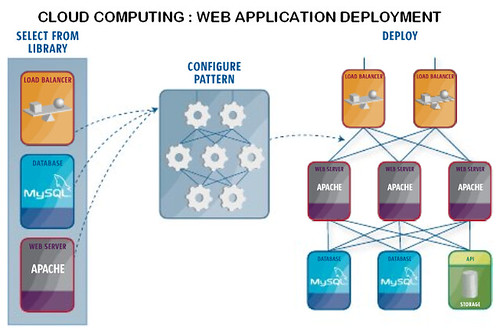
Cloud Computing Web Application Deployment by louisvolant
Descending clouds by Gary Hayes
Enhanced by Zemanta

Tuesday, December 6, 2011

Learner generated content as a pedagogical change agent

English: Schooner Appledore II under construction.Image via Wikipedia
Vickel Narayan started by exploring the notion of learner generated content and showed the extract of a video that showed how hip hop can be used to engage studnents. Vickel also showed some images which illustrated the use of mobile devices in this process, as learning can happen anywhere.

Vickel indicated that he does not believe in the Digital natives term, but has found the learners he has been engaging with are quick to learn.

The mobile projects Vickel has been involved in are very much driven by an ethos of pedagogy, participation and process. The skills being learned can then be applied outside of the classroom and in future jobs.

Vickel introduced the Electronics coourse where they used You tube, Google Docs, Buzz and blogger to enable students to develop their own content and to move away from a traditional paradigm where the lecturer is the sage on the stage. One of the things that was noticed was how quickly the students took over the learning space. As soon as students were encouraged to take ownership of the face-to-face space they completed changed the lay out of the desks and chairs.

Another project discussed was Boat Building. What they did was encourage students to blog and reflect on their experiences...especially mistakes. The lecturer in turn was able to step in and help where he could see where students were struggling. The students created a large repository of videos.

Marine technology was the next project. Vickel mentioned a specific student from Brazil "I've started the 2011 semester...we were tired of listerdning to our tutor talking for two hours every day" and the shift in focus made a large impact on this student who commented positively on the shift in practice.

 The smart shed design

The CAME project was mentioned as a shift in the teaching and learning paradign, and the final project was social learning technologies. Staff actually experienced Web 2.0 on this programme, and then explored the tools in their own context (see here for more detail).


Enhanced by Zemanta

Thursday, December 1, 2011

Harnessing the Smartphone Revolution

Picture of Nokia 770 on Finnish WikipediaImage via Wikipedia
Braden Turner (the innovations manager at Vodafone NZ) was a keynote speaker at the ICELF conference, and he spoke about smart devices, and harnessing the 'revolution'. He fronted up by saying that he is not an mLearning expert, and he will be speaking about network capability, and how this will impact education in NZ.

Smartphones have changed significantly in the past couple of years, and Braden reinforced this point by showing a short video. Much of the video focussed on the technology making decisions for you to "make life easier". It felt as though Braden was searching for links between his corporate presenation and how it may relate to education. Wonder if a little more homework might have helped :-) One suggested example was a student reading a text on their smart device, hopping into their car to get to lectures, and the device automatically switching to an MP3 to continue working with the text.

Apparently 33% of people would rather lose their wallet than their phone - you can always borrow cash, but you can't borrow someone else's phone for the day. Ninety one percent of phone owners will keep their phone within 5 meters of themselves 24/7.

Augmented reality is the concept of using your camera on your mobile device to interface with realtiy. For example, you might be reading a text about welding, and the phone will bring up a video about how to weld, and therefore enhancing the learning experience. Hmmm - someone just tweeted about "where is the human in all of this?" - tend to agree.
Person with PDA handheld device.Image via Wikipedia


We were treated to an overview of the future of  the Vodafone network (Long Term Evolution)...while it is interesting to be reassured that, in theory, the network will cope with heaps of students using their smartphone and from any location (e.g. rural locations)....hmmm - a Tui advert in the making ;-)


Enhanced by Zemanta

Thursday, October 20, 2011

Authentically mobile: Designing learning on the move

Five Mobile SystemsImage by carnero.cc via Flickr
Dr Jan Herrington was a key note at ULearn and started with a good humoured reference to the recent Australian loss in the Rugby World Cup :-)  She then moved on to showing a photograph of her father's classroom and what can be deduced from the picture. You could see the teacher standing at the back and all the students were sitting at the desks looking forward. The technology included a newspaper, an inkwell, and a big cupboard full of resources such as maps. She then brought up a picture of a more modern classroom...and there were more similarities than differences. The main difference was what was in the student's pocket - ie a mobile phone. However, Jan also pointed out that many schools have a non-mobile policy and use words such as not permitted, disruption...and that was just for the teachers.

At the moment there is little use of mobile devices in schools. Jan showed an image of a progressive school ('Funky School') in New South Wales with students working in different spaces and in different ways. She moved on to talk about how getting students to design solutions and resources is a much more powerful way of learning, than reading about it, or answeing questions.
Student Using Cell Phone By the Campus LakesImage by kcolwell via Flickr
Jan spoke about innovative pedagogies that used a couple of mobile devices in 2006/7, and looked at the potential of these devices. The particular focus was using technology in early childhood education. The unit typically was about technologies, or using them, rather than looking at the learning that could be enhanced by access to a number of devices ... they were teaching "'hammer' rather than capentary". As part of a rethink they got the students to create a genuine product that they would share with others, and in the process were modelling an approach to learning. The main focus was creating digital stories on the iPod with a very definite authentic focus. The students found the task pretty challenging, but, at the end fed back that they had gained in confidence and were really pleased that they had been involved in completing it.

It was great that Jan then gave some guidelines for designing authentic tasks, and then went through some concrete examples, and how they related to, for example, epert performance. This means access to the way an expert would thinkg and act as well as access to learners in various levels of expertise and sharing of narratives / stories.


Enhanced by Zemanta

Tuesday, September 28, 2010

eLearning attributes of mobile devices with an emphasis on smart phones and the iPad (Peter Looms at Sharefest)

Peter Olaf Looms opened this session about the attributes of mobile devices, smart phones and iPads with a suggestion that the wait and see approach is an approach but perhaps not the most positive! Do we want to be reactive or proactive? Normally the lead in time for significant developments is a couple of years...things never stay stationary.

A quick overview of mobile technologies and their use was followed by a more in-depth description of some of the uses. So, for example, Peter mentioned that iPads are often used by groups of people (3 or 4 in a group) because the size of the screen is conducive to sharing. However, the smaller device can be more convenient in some circumstances where you might not want to be conspicuous.

Wallace and GromitImage via WikipediaLaptops are seen as work devices, and iPads are not in the same league as far as the range of functionality is concerned - but the aim / use of the devices is ultimately different. There seems to be a lot of focus on products that are based around TV programmes that parents and children can interact through and with (e.g. Wallace and Grommit). Will the iPad replace the picture book? Does it empower the child to interact more (listening to a story can be pretty passive, but don't children interact actively while engaging with a picture book?

Thinking about media consumption per week (e.g. watching TV, playing console games, watching videos and DVDs) surveys can be misleading as there is either social taboos around some media consumption, or the person is truly unsure how much time they spend (an hour may pass in what seems like 5 minutes). There is a wide range of devices that young people use, but they may not have all the3 skills necessary to use them in ways efficacious to learning.
iPad with on display keyboardImage via Wikipedia
Enhanced by Zemanta

Saturday, July 31, 2010

Vocational education and training: Can ICT enhanced learning and teaching help?

WPA Adult Education (New Deal)Image via Wikipedia
The Vocation Education and Training (VET) Sector, for those who are not sure, "prepares trainees for jobs that are based on manual or practical activities, traditionally non-academic, and totally related to a specific trade, occupation, or vocation". In New Zealand the VET sector is in part serviced by 39 Industry Training Organisations (ITOs), as well as by Polytechnics, Private Training Establishments, and Wananga.
A couple of the key points that make it necessary to think creatively when considering ICT enhanced learning and teaching (ICTELT) and the VET sector include meeting the needs of these learners who will, like all learners, have a variety of learning preferences, but may also face literacy, language and numeracy challenges, and life and work commitments. These same learners are likely to also have a rich range of skills (both formal and informal) and need a way to capture their prior learning and experience (click HERE to watch a student speak about Recognition of Prior Learning - RPL). If  ICTELT is seen as a positive way of assisting learners to learn creatively, however, then these are also the students and trainees, who are likely only to have limited access (at best) to connectivity and technology. On top of all these factors is the culture that is often prevalent in industry where learning 'virtually' at a distance or in a blended course is perhaps not seen as feasible or effective (click here to download a report from 2008 around the New Zealand context entitled "Using e-Learning to build workforce capability: A review of activities", and for comparison a report about small businesses and eLearning in Australia in 2008).

Civil Engineer Students at Dubai Men's College
Nevertheless, times are changing, and with them is increased access to broadband (see for example the National Broadband map for NZ and click this link for an explanation why bandwidth is important), personal ownership and use of computer(s) and mobile phone(s) is increasing (click here to see the 2009-2010 statistics), a greater awareness that 'soft' skills such as critical thinking, as well as social and communication skills are as important as the key competencies required to be effective in a specific career.
Flexibility and meeting learning needs and preferences, while making learning accessible to as many people as possible are key factors, and ICTELT and well-designed blended and distance courses appear to offer the potential to work towards these ideals.
This resource provides links to a few examples and case studies of ICTELT use in VET, in particular from Australia where there is a massive initiative in this sector see for example the Australian Flexible Learning Framework who have a massive range of resources, events, research, case studies, reports, training and ideas). There are also links to a couple of associated research articles and tools. Please let me know if you have anything you would like me to include in this resource - I would be really glad to do so :-)

Community and learning

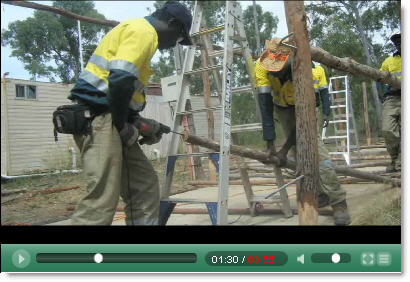
One of the most exciting examples of bringing together community and VET training in a culturally responsive way is the initiative trialled in 2009 in conjunction with the Garma festival (located 40km from the township of Nhulunbuy (Gove) in the Northern Territory, Australia at the Gulkula festival site. The festival theme was  Creative Industries, with four vocational foci:
  • Construction
  • Multimedia
  • Tourism - specifically tour guiding
  • Music
To listen to Roger Bryett speak at the Creative Indigenous Economies forum please click HERE (mp3 - 8.75mb).
To view the streaming video of Roger Bryett speaking at the forum about this initiative please click HERE
Image source
Other examples include (all from Australia):
  • 'Top End Groove' - a project that aims to establish a cultural tourism business and training network. The project aimed to develop and grow indigenous and cultural tourism businesses through the use of technology and eLearning by enabling knowledge sharing, improving access to skills training and creating a central point for promotion and marketing indigenous tourism. Click HERE to listen and find out more about the project
  • The Jobs for our Mob project was established to develop an e-training centre which incorporated technology to identify and deliver the pre-vocational skills required for indigenous people wanting to enter the mining, construction or engineering fields.Click HERE to listen and find out more about the project.
  • This case study, "Panel beating apprentices take to technology", describes an Australia-wide skill shortage in the automotive vehicle body repair industry first prompted Brisbane North Institute of TAFE todevelop a programme with training materials available on CD-Rom and online, thereby making a traditional industry area more technologically savvy.

Examples of online environments in the VET sector

Example home page designed for an LMS

ePortfolios

To view this video full size, please click HERE
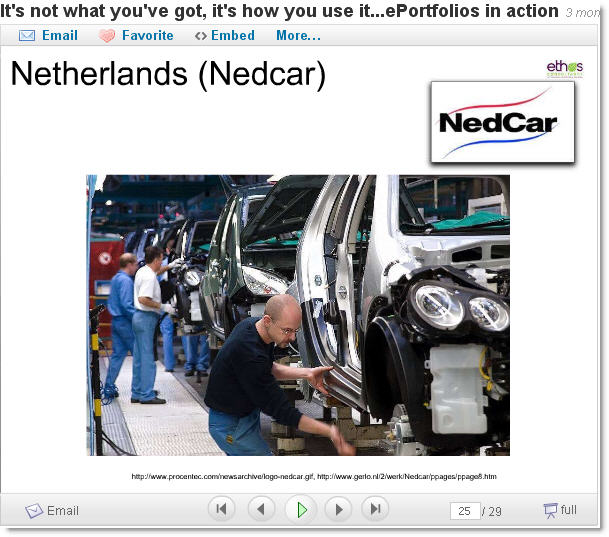
An ePortfolio helps students with the identification, assessment and recognition of what they know and can do, and could include evaluations, comments, feedback and reflections from peers, managers, facilitators etc who have been involved in the applicants life/learning journey. The assessment, therefore, of what a person can do is from authentic sources, collected over time (click this link to access "Verification of a person's aualification e-portfolio use cases", and this link to access "Vocational Education and Training e-portfolio use cases").
The contents of an ePortfolio would be assembled over time, and could include some or all of the following:
  • Evidence of informal or professional networks regularly cultivated, contributed to, and participated in online and why these have been important / influential
  • Examples of ideas, thinking, innovations from the applicant that have been shared in communities (including online) and what comments, feedback and reactions were elicited
  • Illustrations of collaborative creativity, problem-solving and work (including with online contacts and communities)
  • Work samples  e.g. something the applicant has designed, created, done or written (including video records of processes, images of projects at various stages of completion, and a selection of images of showcase, finished pieces)
  • A record of  performance  e.g. video recording, reflections (audio/written), appraisals (audio/written - elicited and spontaneous)
  • Copies of any statements, references, images, video clips, audio, or articles about the applicant's employment or community involvement 
  • Documents which recognise the applicant's expertise, e.g. copies of licences, awards, prizes, membership of professional bodies - along with reflections / comments around these achievements
  • Evidence of training  e.g. copies of school reports, certificates or statements about education and training / outline of any course the applicant may have undertaken
  • References or letters / performance reviews from employers, work colleagues, clients, community leaders that link specifically to required competencies or elements covered
For a fuller list of resources around using ePortfolios to enhance education in general, with some examples relevant for VET, click HERE.
Hairdressing, a case study using Mahara
Examples of ePortfolio use in the VET sector include:

Multimedia

For a fuller list of resources around using multimedia to enhance education in general, with some examples relevant for VET, click HERE.

Support: Completion, retention and success

This report ("Student Learning Support Programmes that demonstrate tangible impact on Retention, Pass Rates and Completion") is a combination of summaries and brief case descriptions of some of the effective programmes and other support mechanisms that NZ Tertiary Learning Advisors (TLAs) provide for students in universities, polytechnics, institutes of technology, and other tertiary institutions (click HERE for the executive summary). Findings indicated that there were significantly higher course pass rate for students who used the programme (84.4%, compared to 69.8% for those who did not use the programme), as well as significantly higher final exam pass rates (71.6%, compared to 62.8%). Some of the strategies included the hosting of models, guides, examples and support in a Learning Management System (LMS) alongside personal, one-to-one support, and the use of an online skills survey. However, the main finding was that relationship and trust building, as well as recognition of learning preferences and cultural appropriacy, were key factors for success.

Assessing and assessments

Assessing and assessments can take many forms, including:
  • Facilitate and record a discussion within a trainee's community, where members of that community speak about the applicant
  • A narrated 'learning story' (recorded - audio or video)
  • Record an oral presentation for the assessor or assessment panel
  • Take part in a role play (asynchronously or synchronously - face-to-face or virtually; e.g. in Second Life)
  • Demonstrate knowledge/application of skills through a scenario with video/audio evidence recorded
  • Be assessed on the job with video/audio evidence recorded
  • Complete an online assessmen
  • Complete a project that is partly or wholly online, and possibly part of an ePorfolio
  • Have skills and knowledge attested to by an appropriate person, e.g. Kaumatua
Where multimedia is used there can be no question as to the authenticity of the event / process. Furthermore, there is potential for reliable evidence, when compared with a paper-based portfolio, of competency and application of the in required skills in 'real world' contexts.
Although there is no mention of ePortfolios or alternative ways of collecting evidence in these following reports, it is worth bearing in mind some of the principles mentioned: "Assessment of Learning in the workplace: A Background Paper", which can be read in conjunction with "A guide to good practice in ITO structures and systems for on-job assessment".
Enhanced by Zemanta